
This section shows how ID Scan from OneID® can be customised. Customisation allows you to enable specific flows and acceptable documents. It also allows you to change screens to better reflect your own brand.
UI and Branding
The following UI and branding elements can be specified.
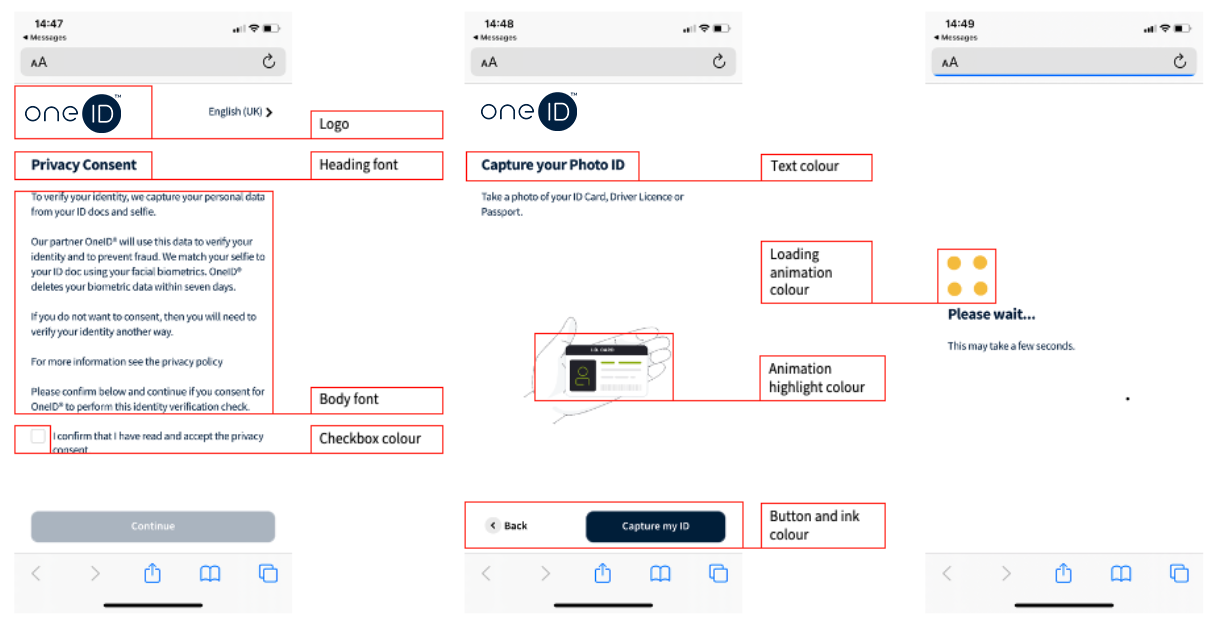
Fonts
Font colours
Button and checkbox colours
Highlight colours
Animation colours
URL’s
Portal URL’s
Production URL’s
Favicons

End User Messaging
The following end user messaging can be configured. We can provide recommended wording where required.
Sender ID
SMS content
Reminder SMS content
Privacy declaration copy – we can provide a copy if required
Verification complete copy
Flow Settings
Number of documents required
Accepted documents
Data Verification – data is matched to a CRA where available
Include Age Restriction
Transaction expiry period
Reminder SMS time delay
Mobile country code restrictions
Data
Data purge period
Auto redaction period
Address capture
Channel Customisation
Within a single instance of ID Scan, you can set up channels. Channels may reflect different departments, branches, or brands within your organisation. For example, one channel may be used for renting while another is used for sales.
The following elements are customisable by channel:
Initial SMS content and expiry time
Privacy Consent copy
Mobile flow - logo
Mobile flow – button, link and checkbox colour
Mobile flow – heading and body fonts / colours
Mobile flow – Verification complete screen copy
Data provider
Accepted documents
Accepted Passport Types and Countries for RTW Channel
ID Scan accepts many different types of passports including, standard issue, diplomatic, travel, service, and emergency passports. To find out more about accepted passports and countries, visit our Country and Language page.
End users who are not UK nationals are responsible for generating and providing their share code, we are unable to do this on their behalf. End users can do so following the instructions on the following page: www.gov.uk/prove-right-to-work/get-a-share-code-online